Profiling TorchNeuron (Part 1): System-Level Profiling on AWS Trainium
Most ML practitioners have intuition about how to make models run fast, but fewer know how to analyze why a model is slow. This post is a from-scratch walkthrough of system-level profiling for inference on AWS Trainium, the purpose-built AI chip, with TorchNeuron, the open source native PyTorch backend. It covers how to configure torch.profiler with the Neuron backend, read the key_averages() table, and follow one operation through Neuron Explorer from framework dispatch to NeuronCore execution.
The Neuron backend plugs into upstream PyTorch through the PrivateUse1 extension point, letting an accelerator integrate without a dedicated CUDA-style dispatch key. Profiling uses two objects: NeuronConfig selects which data streams and NeuronCores to capture (modes, profile_output_dir, capture_enabled_for_nc) and whether to propagate device time into key_averages() via correlate_device_time=True; NeuronProfiler supplies the export_trace callback that writes trace.json alongside the Neuron system traces. The profiler must include ProfilerActivity.PrivateUse1, pass NeuronConfig as experimental_config, and call torch.neuron.synchronize() inside the loop; without the sync, export can precede device completion and leave the Neuron time column empty. The example schedule is wait=2, warmup=1, active=1 over four prof.step() calls, recording one warm iteration without initial setup overhead.
The target is RMSNorm, profiled in three directly comparable implementations: naive PyTorch operations, the built-in torch.rms_norm(), and the naive function wrapped with @torch.compile(backend=’neuron’, fullgraph=True). For the naive version, key_averages() sorted by self_privateuse1_time_total shows aten::mul with 3 calls and 1,164.5 μs of Neuron device time (49.5%), aten::add at 434.6 μs (18.5%), aten::rsqrt at 415.0 μs (17.6%), and aten::mean at 340.8 μs (14.5%), for 2.355 ms total; the full output also contains CPU-side events such as allocations and host-to-device transfers.
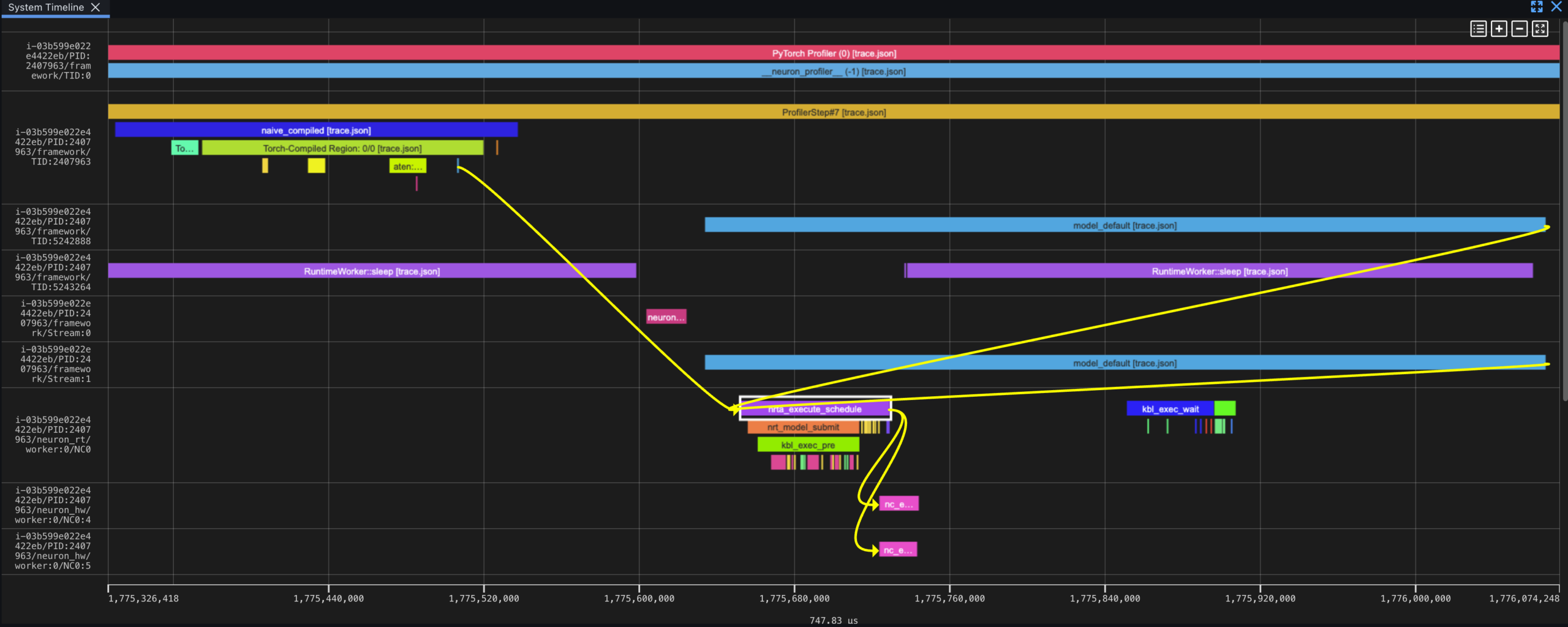
Neuron Explorer is the browser-based viewer for the system trace, device timeline, and per-engine breakdown. The profile output includes the system trace plus matched .neff and .ntff files when device data is captured; a .neff contains the compiled Neuron executable and its .ntff carries the hardware instruction trace, paired by a shared numeric hash. Lanes are organized as framework dispatch, framework device, Neuron Runtime, and Neuron Hardware. In eager mode each operation runs independently, so the dependency chain viewer can follow aten::mul.Tensor from the framework layer through runtime scheduling (nrta_execute_schedule) to hardware execution (nc_exec_running).
The fused torch.rms_norm reduces the table to one aten::_fused_rms_norm entry: 403.3 μs device time, 47.6 μs self CPU, and 100% of Neuron time. The compiled version appears as a single Torch-Compiled Region: 0/0 with 375.5 μs device time and 98.4 μs self CPU; TorchDynamo captures Python bytecode as an FX graph, AOTAutograd lowers it to ATen operations, and the Neuron backend fuses and compiles the complete graph into one NEFF artifact run as a single hardware dispatch.
Side-by-side, naive ops use 2,355 μs of Neuron time with about 125 μs self CPU and six operator calls; torch.rms_norm uses 403 μs and about 48 μs self CPU; naive + torch.compile uses 376 μs and about 98 μs self CPU. Either fused approach takes roughly one-sixth of the naive device time because fusion removes gaps between hardware executions and avoids materializing intermediates such as x_sq and mean_sq. The same workflow applies to larger models: find a hotspot in the table, verify it in the trace, then decide whether a fused operation or torch.compile can reduce the cost. Part 2 moves to device-level profiling, where you open the NEFF, inspect the TensorEngine, VectorEngine, and DMA breakdown, and place the kernel on the roofline to determine whether it is compute-bound or memory-bound. The reproduction scripts are available in the torch-neuronx examples directory.