Siri Recaps on Apple Watch: Useful AI notes with a creepiness catch
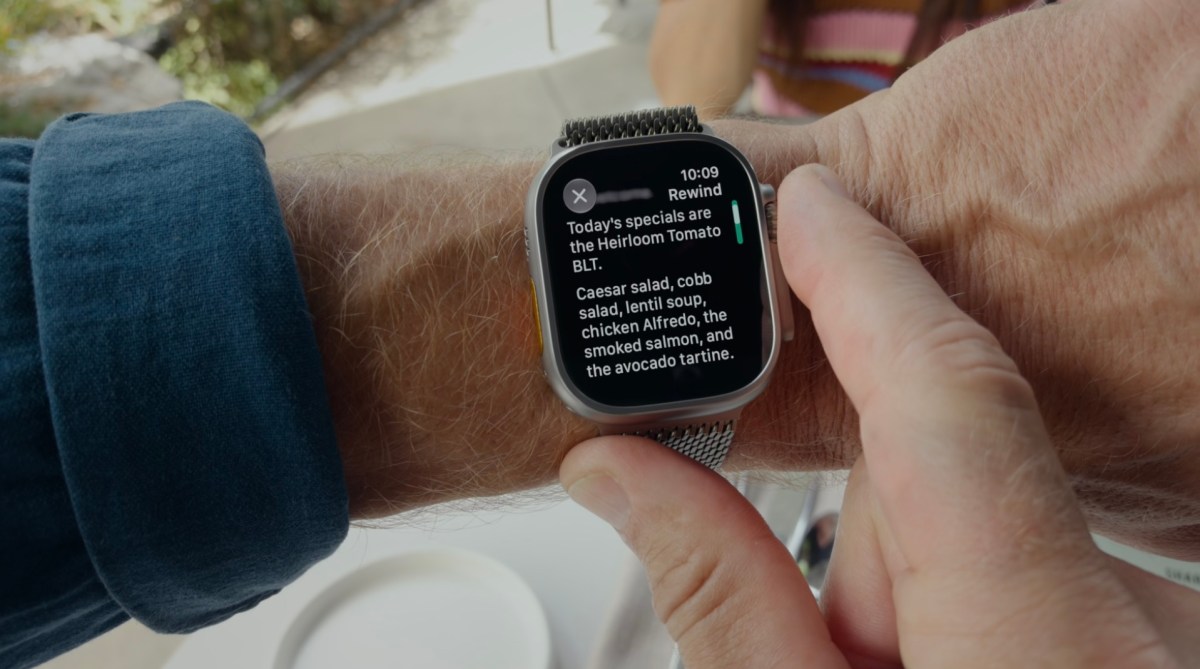
On Tuesday, Apple began testing new Audio Intelligence features in the first developer betas of iOS 27.3 and watchOS 27.3. The features let Apple Watch Series 12 wearers detect important sounds, identify songs, catch up on conversations, and take notes. Sound detection is meant to help deaf and hard-of-hearing users recognize alarms or doorbells, and song identification uses Shazam’s technology. The more notable additions are Live Rewind, which lets the wearer go back to see what was said in the past 15 seconds, and Siri Recaps, which summarizes audio throughout the day and saves notes about important things that were said.
Apple says the audio is processed and AI models run on-device when possible, that speakers are not identified, that raw audio files are not stored, and that private information such as government ID numbers and personal account information is redacted. Still, the author of this TechCrunch hands-on finds herself sympathetic to both sides: she often dislikes how pervasive technology has become, but she sees real value in what Apple built. She had not yet had an appropriate chance to test Live Rewind and expects she is more likely to just ask someone to repeat something than to use it.
With Siri Recaps, however, she immediately saw how it could become a daily tool. Testing it during a real-world trip to drop off a teen’s car for repairs and pick up a rental, she later found that the feature had captured key verbal details: the deductible, the repair time frame, the amount of gas in the rental at the start, and other things she wanted to remember. The downside was that because she configured Siri Recaps to run at all times, it also saved non-essential moments, such as an errand the family needed to run, babysitting timing, and a plan to watch midterms coverage on TV, mixing them into the same note as the car-repair information. That served as a reminder that the feature was listening to everyday conversations, which could feel invasive in more personal scenarios. She considered turning it off at home in the evening so dinner-table chatter would not become note fodder.
The author would like Apple to save extraneous details as separate notes or at least dedicated sections that could be exported or deleted on their own, to let users swipe left on an individual bullet point to remove it from a Recap instead of using edit mode, and to offer a setting that automatically exports saved Siri Recaps to Apple Notes. She also notes that a saved Recap could be exported to Apple’s Journal app when it was something someone wanted to record for personal reasons. While she was not immediately warmed to the idea of the Watch always listening, she concludes that automated note-taking of this sort is valuable in daily life.