Pick-and-Place Robot Simulation with SimReady Assets in Isaac Sim
SimReady Central is an open asset library on Hugging Face that provides robots and objects as OpenUSD assets with authored simulation properties. For robotics, SimReady means an asset has been prepared with the properties needed for a defined simulation use case: collisions, mass, joints, and joint drives. The SimReady Foundation specification connects three levels: a profile (a group of features for a use case), features (capabilities such as controllable joints), and requirements (checks on settings such as a joint’s drive settings). Validation checks the asset against the profile requirements; the pick-and-place run then tests whether arm, gripper, can, and controller work together. The UR17G arm report uses Robot-Body 4.0.0, the Robotiq 2F-140 gripper report uses Robot-Gripper 3.0.0, and both pass PhysX driven-joint checks.
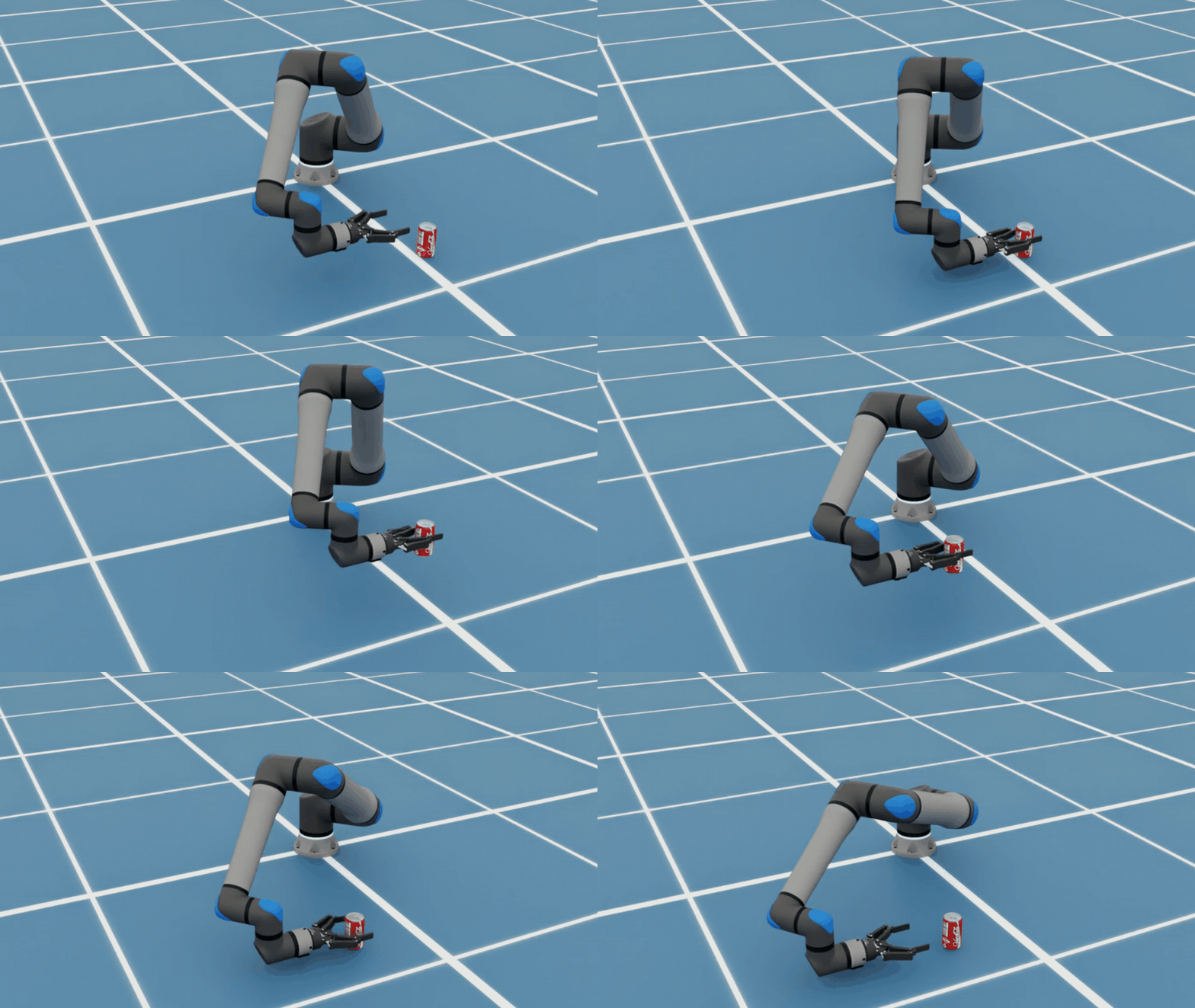
The example composes the UR17G arm, Robotiq 2F-140 gripper, and beverage can in Isaac Sim, then asks a frontier AI model to help create and run the task code. The article uses GPT-6 Sol with bundled Isaac Sim skills, but notes that another agent and model combination may work if it can load the required skills and execute Python against Isaac Sim; generated code and results can vary. Required software is Isaac Sim 6.2. The workflow is to download the three assets from SimReady Central, keep all complete asset folders intact so supporting files resolve, start Isaac Sim with the remote Python server enabled, start the agent from the Isaac Sim directory so it can access skills, assemble the arm and gripper into a single articulation, and validate the assembly. The sample prompt references the Robot Assembler tutorial, and the agent used the isaac-sim-remote and usd-articulation skills.
Before running pick-and-place, the scene should be checked for correct behavior: review arm and gripper joint limits and drive settings, test a small arm movement and gripper opening and closing, and confirm the can rests on the work surface without falling through. During the task, watch whether the can stays in the gripper as the arm moves. The example prompt asks the agent to run pick-and-place with a contact-based grasp and validate accuracy or placement error; skills used include isaac-sim-remote, manipulation-ik, and physics-simulation. If the run differs, reset the can and robot to the same starting state before retrying so results are comparable.
The source states explicit boundaries: the setup is fixed, with a known can position, anchored robot, clear flat workspace, no vision, and limited collision checks. The can is simplified, with no deformation or liquid motion modeled, so the example does not test crushing. The grasp is scripted: a horizontal grasp with a 2 N·m drive-effort cap chosen through simulation tests, not calibrated to fingertip forces or manufacturer recommendations; contact and friction hold the can as the arm follows fixed waypoints without replanning. These results apply only to this scripted setup and do not establish robustness to uncertain object positions, different payloads, or real hardware. For building a similar task, the article points to browsing SimReady Central, reviewing profiles and validation reports in SimReady Foundation, following Isaac Sim installation and Agent Skills documentation, and using the Robot Assembler tutorial or the SimReady asset submission guide.